
Monmouth County Court Dockets list all scheduled court cases, hearings, and proceedings in Monmouth County. They provide case numbers, hearing dates, parties involved, and court division, enabling attorneys and the public to track legal matters efficiently. Using the docket search, users can locate specific cases, confirm hearing schedules, and monitor ongoing court activity. These dockets ensure transparency and streamline planning for legal professionals and participants. Access to updated case calendars keeps users informed of upcoming court sessions.
Court dockets are essential for tracking case progress, referencing past hearings, and organizing legal workflows. Users rely on them to check motion dates, trial schedules, and status updates for civil, criminal, and family cases. By consulting Monmouth County Court Dockets, parties can prepare filings, schedule appearances, and verify court assignments. The structured layout of each docket entry supports efficient case management. This page outlines methods to perform a precise docket search and interpret the court calendar accurately.
What Is a Court Docket?
A court docket is an official record that summarizes all actions, filings, and events in a legal case. It tracks the progress of cases and provides essential details for attorneys, judges, and the public.
Court dockets serve as a central log for each case in a courthouse. They record every step, including motions filed, hearings scheduled, and court orders issued. This helps ensure transparency and keeps all parties informed about case developments.
Typical Information Found in a Court Docket
A court docket usually contains:
- Case Number: The unique identifier for each case.
- Names of Parties: The plaintiff(s) and defendant(s) involved.
- Attorneys: Names of legal representatives for each side.
- Hearing Dates: Scheduled dates for hearings, trials, or motions.
- Motions and Filings: Documentation of motions, petitions, or legal requests submitted to the court.
- Court Orders and Judgments: Any official rulings issued by the judge.
This information allows attorneys to prepare for upcoming hearings, track deadlines, and respond to filings efficiently.
Docket Listings vs. Case Calendar vs. Case Records
While these terms may seem similar, each serves a distinct function:
| Term | Description | Purpose |
|---|---|---|
| Docket Listing | A chronological summary of case activity | Shows the sequence of filings and hearings |
| Case Calendar | Schedule of upcoming hearings and trial dates | Helps parties know when to appear in court |
| Case Records | Complete documents and filings for a case | Provides full legal documentation for review |
Docket listings focus on case updates, whereas a case calendar emphasizes future scheduling. Case records include all supporting documents, evidence, and court orders, offering a more detailed account of the legal process.
How to Search Monmouth County Court Dockets
Searching Monmouth County court dockets can be done through state and local systems using names, case numbers, or other identifying information. Multiple tools allow the public to view case activity, filings, and upcoming court dates efficiently.
Official NJ Courts Public Case Search
The New Jersey Courts provide a “Find a Case” tool for searching statewide case information. This system covers civil, criminal, family, and appellate cases, making it a primary resource for Monmouth County docket searches.
Steps to use the NJ Courts public case search:
- Go to the official New Jersey Courts website: https://www.njcourts.gov/courts
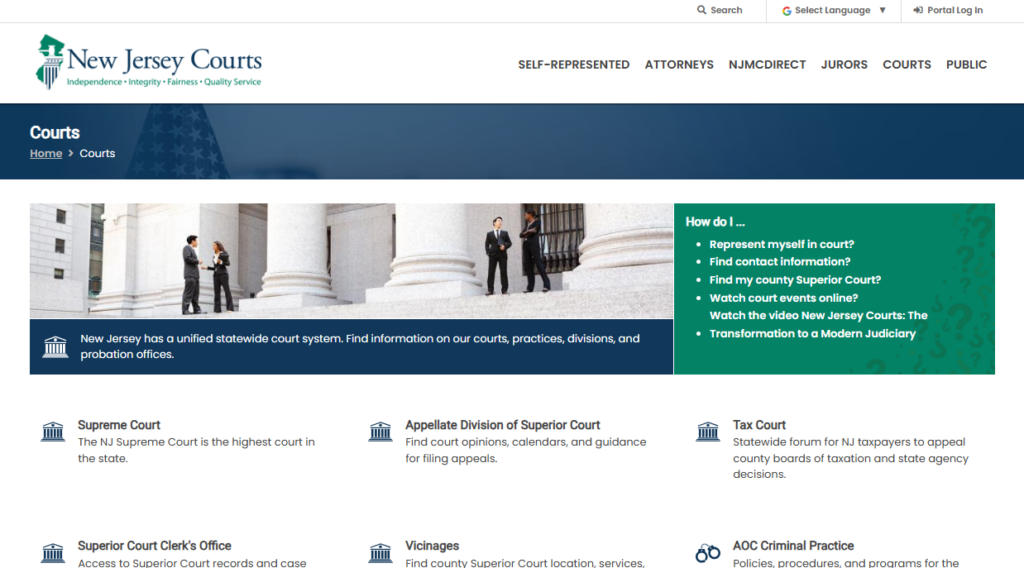
- Select Portal Log In on the homepage to access the court portal.
- Locate and click Attorney Search (njcourts.gov) at the top of the portal page.
- Type the lawyer’s name, license ID, or other relevant information in the search box.
- Browse the results to check attorney credentials, license status, and contact information.
Searching on the Local County Clerk & Records System
Monmouth County maintains its own records system through OPRS (Online Public Records Search). This system allows users to access superior court dockets, property liens, and recorded judgments directly from the county.
Steps for using the Monmouth County OPRS system:
- Go to https://oprs.co.monmouth.nj.us/oprs/index.aspx
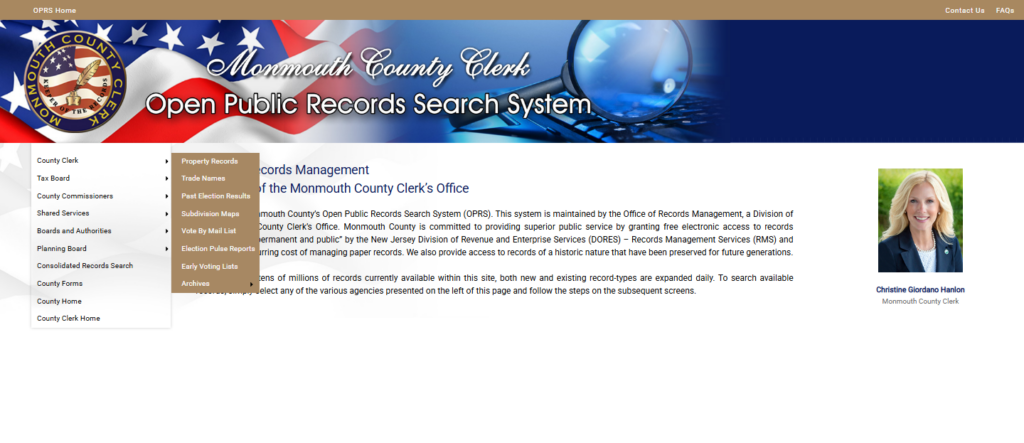
- Select the search type: Property, Trade Names, Election Results, or Consolidated Records.
- Fill in the required field (Owner Name, Address, Document Number, etc.).
- Click the Search button.
- Access the desired record from the results page.
Tips for accurate searches:
- Include middle initials if known to reduce false results.
- Docket numbers provide the most precise results.
- Combine filters to narrow down results efficiently.
Using Municipal Court Case Search Where Applicable
Some cases in Monmouth County are handled at the municipal court level rather than the superior court. Municipal courts typically deal with traffic violations, minor criminal offenses, and local ordinance matters.
How to search municipal cases:
- Go to the Link: https://portal.njcourts.gov/webe41/MPAWeb/ and click “Press Search to continue.
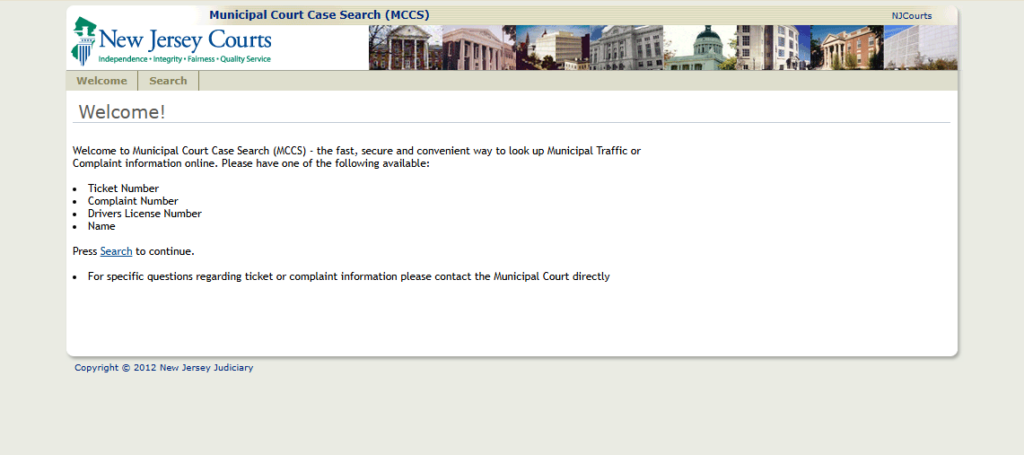
- Accept the Disclaimer: Read if needed, then click “I Accept”.
- Access Case Search Interface: The Case Search page will appear after accepting.
- Choose Search Option: Click “Search By” dropdown and select: Name, Case Number, Municipality, or Violation Type.
- Perform the Search: Click Search to view matching cases.
- I can also make a version with a clickable “Search Now” button for your page to make it more user-friendly. Do you want me to do that?
Common Docket Search Results Explained
After searching, the results will typically include several fields. Understanding these can help interpret case information clearly.
Key fields in a Monmouth County docket search:
| Field | Description |
|---|---|
| Case Number | Unique identifier for the case |
| Case Type | Civil, Criminal, Family, or Special Civil |
| Filing Date | Date the case was officially filed |
| Parties | Names of plaintiff(s) and defendant(s) |
| Attorney | Representing counsel for each party |
| Status | Current stage: Open, Closed, Pending, or Dismissed |
| Next Hearing | Scheduled date for court appearance or motion hearing |
| Judgments or Orders | Decisions entered by the court or pending rulings |
Monmouth County Court Hearing Dates & Case Listings
Court hearing schedules list upcoming cases, showing hearing dates, assigned judges, and courtroom locations. They allow parties, attorneys, and the public to track court activity efficiently.
Monmouth County court schedules provide a clear view of how cases are organized day by day. They display essential details like hearing dates, courtroom assignments, and the judge presiding over each case. This helps participants plan attendance, prepare documents, or contact the court for additional information. Court schedules are often updated regularly, reflecting changes in case assignments, continuances, or cancellations.
What the Court Calendar Shows
The court calendar lists all scheduled hearings for a given period. Key elements include:
- Hearing Dates: The exact date and time a case is set to be heard.
- Courtrooms: The physical room or courtroom number where the hearing will occur.
- Judges Assigned: The name of the judge handling the case.
These details are essential for attorneys, defendants, and plaintiffs. By checking the court hearing schedule, participants can confirm which cases are being addressed and when. Some court calendars also include the type of hearing, such as motions, trials, or status conferences.
Upcoming Hearing Listings
Below is a sample representation of a Monmouth County court hearing schedule:
| Case Number | Party Names | Hearing Date | Courtroom | Judge | Hearing Type |
|---|---|---|---|---|---|
| 2025-CR-101 | State v. Johnson | 01/15/2026 | 3B | Hon. Smith | Motion Hearing |
| 2025-CV-234 | Doe v. XYZ Corp. | 01/16/2026 | 2A | Hon. Williams | Trial |
| 2025-FM-110 | Lee v. Lee | 01/17/2026 | 1C | Hon. Brown | Custody Hearing |
This table shows how information is organized for quick reference. Courts may offer digital calendars that update automatically with new dates or changes.
Tips for Reading Hearing Schedules
Reading a court schedule can be confusing without knowing the terminology. Common notations include:
- Continued: The hearing is postponed and rescheduled for a later date.
- Adjourned: The hearing has been temporarily paused or delayed.
- Set for Trial: A case is officially scheduled for trial on a specific date.
Additional tips for interpreting a case calendar include:
- Check the hearing type to understand what will occur that day.
- Confirm the courtroom and judge to ensure you attend the correct session.
- Note any remarks or special instructions provided in the calendar.
Being familiar with these terms helps avoid missed hearings or misunderstandings.
Scheduling Changes & How to Stay Updated
Court schedules can change frequently. Hearings may be rescheduled due to judge availability, case complexity, or administrative issues.
To stay informed:
- Check the official Monmouth County court website for updated schedules.
- Call the court clerk’s office for confirmation of dates or changes.
- Sign up for notifications, if offered, to receive alerts about schedule updates.
Courts aim to keep participants informed, but verifying the schedule before attending is crucial. Frequent updates and clear communication help all parties manage their time efficiently.
Types of Cases & Dockets in Monmouth County
Monmouth County maintains separate dockets for different types of cases, each with its own schedule, filings, and procedures. These dockets help the court organize civil, criminal, family, juvenile, and municipal matters efficiently.
Civil Case Dockets
Civil case dockets track lawsuits between individuals, businesses, or organizations over disputes such as contracts, property, or personal injury. Each docket provides details about motions, hearing dates, pleadings, and case status.
Key features of civil dockets:
- Case number and filing date
- Parties involved (plaintiff and defendant)
- Scheduled hearings and motions
- Court decisions or rulings
- Document access, such as complaints, answers, and affidavits
Users can review civil dockets to monitor pending motions or upcoming hearings. Many filings are available online through the New Jersey Courts Public Case Search, while sensitive documents may require in-person requests.
Criminal Case Dockets
Criminal dockets record cases involving alleged violations of state law. These dockets cover everything from minor offenses to serious felonies, listing arrests, charges, and scheduled proceedings.
Information typically found on criminal dockets:
- Defendant details and charges
- Arrest and arraignment dates
- Bail or release conditions
- Upcoming court appearances
- Case disposition or sentencing
Criminal dockets help attorneys, defendants, and the public track the progression of a case. For example, Superior Court criminal dockets provide more detailed updates than municipal dockets, which handle minor offenses.
Family & Juvenile Dockets
Family and juvenile dockets focus on legal matters involving children or family relationships. These include divorce, child custody, child support, and juvenile offenses.
Key elements in family and juvenile dockets:
- Divorce filings and procedural steps
- Custody and visitation schedules
- Support orders and modifications
- Juvenile delinquency hearings
- Protective orders or dependency cases
These dockets help parents, guardians, and legal representatives follow schedules for hearings or motions. Juvenile cases are usually confidential, with limited public access to protect minors.
Municipal Case Dockets
Municipal dockets cover local ordinance violations, traffic tickets, and minor criminal charges handled in municipal courts. They provide a simpler, more streamlined record than Superior Court dockets.
Typical municipal docket information:
- Violation type (e.g., traffic, petty disorderly conduct)
- Filing and hearing dates
- Fines or penalties
- Payment or compliance instructions
Municipal dockets allow residents and attorneys to track cases efficiently. They often distinguish between municipal and Superior Court cases, as serious offenses escalate to the Superior Court.
Common Problems & Solutions
If a docket search returns “no results found,” it usually means the case hasn’t been entered, the information is restricted, or search details were incorrect. Some records may not appear online, and contacting the Clerk can often resolve questions or provide information. Searching Monmouth County court dockets can occasionally produce unexpected results. Users may type a name incorrectly, enter incomplete information, or try to access records that are not publicly available.
Common reasons for missing results include:
- Incorrect spelling or formatting: Court databases require exact spellings of names and accurate date ranges.
- Case not yet filed or updated: Newly filed cases may take days to appear in the online system.
- Restricted records: Juvenile cases, sealed records, or certain family law matters are not publicly accessible.
- System errors: Occasional downtime or technical glitches can temporarily affect search results.
When a search does not return results, contacting the Monmouth County Clerk’s Office can clarify whether the case exists or is restricted. The Clerk can also verify filing dates, provide guidance on correct search criteria, and explain why certain records remain unavailable.
Contact options include:
- Phone: (732) 431‑7324
- Email: CountyClerk@co.monmouth.nj.us
- Address: Market Yard, 33 Mechanic Street, Freehold, NJ 07728
For users experiencing repeated issues, troubleshooting the docket lookup involves checking:
- Spelling of party names, including aliases.
- Date ranges entered during search.
- Correct case type selection (civil, criminal, family, etc.).
Some records remain unavailable online for privacy or legal reasons. Restricted documents may include:
- Juvenile cases
- Adoption records
- Sealed criminal or civil cases
- Certain family court filings
Even when records are restricted, the Clerk’s Office can confirm whether a case exists and provide information on next steps for authorized parties.
Locations & Contact
Monmouth County Courthouses are conveniently located to serve residents for a variety of legal matters. Each courthouse division handles specific case types and provides clear points of contact for public inquiries.
Main Courthouse Address
The primary Monmouth County Courthouse is located at:
71 Monument Street, Freehold, NJ 07728
- Phone: (732) 431-7000
- Fax: (732) 409-1530
- Hours of Operation: Monday–Friday, 8:30 AM – 4:30 PM
- Public Parking: Available adjacent to the courthouse with designated visitor spaces
This location serves as the central hub for county judicial operations, including filing cases, attending hearings, and requesting official documents. The courthouse address is commonly used for correspondence and legal notifications.
Divisions and Departments
The Monmouth County Courthouse hosts several court divisions and administrative offices. Each division manages specific types of cases:
| Division/Department | Purpose/Contact Information |
|---|---|
| Family Division | Handles divorce, custody, and support cases |
| Domestic Violence Unit | Addresses restraining orders and protection cases |
| Criminal Division | Oversees criminal trials and arraignments |
| Civil/General Civil Division | Manages civil disputes, small claims, and lawsuits |
| Clerk’s Office / Records Department | Processes filings, maintains public records |
These departments operate as part of the overall court administration and are staffed with personnel trained in handling legal inquiries efficiently. Clear communication with the correct division ensures faster responses and accurate guidance.
FAQs — About Court Dockets
This section provides clear answers to common questions about docket listings, case calendars, and hearing dates in Monmouth County. Each response gives practical information to help users track court activity effectively.
How do I find a docket by case number?
Finding a docket by case number is simple when the correct number is available. This unique identifier links directly to all filings, hearings, and case activity. By entering the case number in the Monmouth County court records search portal, users can access detailed information, including parties involved, filing history, and upcoming hearing dates. Some older or archived cases may only be available in physical records at the courthouse, and contacting the clerk may be necessary in those instances. Using the exact case number ensures accuracy and avoids confusion with other cases.
Can I view court hearing schedules online?
Monmouth County provides online access to court hearing schedules through its case calendar, allowing users to see upcoming hearings and courtroom assignments. The schedule shows case types and hearing dates, and it is regularly updated to reflect new filings or changes. Users can search by case number, court division, or date range to find relevant information quickly. While most hearings are listed online, some confidential cases may require direct contact with the clerk to verify the schedule. Checking the calendar frequently helps ensure that users have the latest information.
What does a docket number mean?
A docket number is the official identifier assigned to each case, organizing filings, hearings, and court activity in a consistent format. Typically, it includes the year, court type, and a sequential number that distinguishes it from other cases. The docket number allows attorneys, court staff, and parties to track case progress efficiently and ensures that all documents are correctly linked. Using the docket number makes searches faster and more reliable, especially in busy court divisions with multiple cases filed daily.
Are court dockets public record?
Most court dockets in Monmouth County are public records, allowing the general public to view case activity, filings, and hearing dates. In certain cases, such as juvenile matters, adoptions, or sealed family law cases, remain restricted and cannot be accessed online. Public records are usually available through the county’s online portals, while older cases may require in-person requests at the courthouse. Being aware of which cases are public helps users focus on records they can legally review without complications.
How often are hearing dates updated?
Hearing dates are updated regularly to reflect rescheduled or newly scheduled court appearances. The online case calendar is frequently refreshed to provide the most current information about upcoming hearings. Users should check the schedule before attending court to avoid conflicts or missed dates. Accurate updates ensure that attorneys, parties, and the public have reliable information for planning and tracking court activity.