The Monmouth County Court Case Search provides an easy way for residents, attorneys, and researchers to access official court records and case information. Whether you are looking for civil, criminal, family, or municipal case filings, this guide explains how to locate and review Monmouth County court records efficiently. By using the official online portals and understanding the available search tools, users can quickly perform a Monmouth County case lookup with confidence.
In addition to online search options, Monmouth County Court offers access to public case search systems, including the Open Public Records Search (OPRS) and NJ Courts’ “Find a Case” portal. This page outlines step-by-step instructions, highlights key fees and restrictions, and provides guidance on requesting certified copies of judicial records. By the end, users will have a comprehensive understanding of how to access court filings, interpret case information, and navigate the Monmouth County judicial records system effectively.
What Is a Monmouth County Court Case Search?
A Monmouth County Court Case Search is a process used to locate and review official court records for cases filed in the county. It allows anyone to check details about civil, criminal, family, or municipal court cases in Monmouth County quickly and accurately.
Court Records and Judicial Records
Court records, often referred to as judicial records, include all official documents generated during a case. These may consist of court filings, motions, judgments, and other legal documents. A Monmouth County Court Case Search lets users see case-related information such as:
- Case number and filing date
- Parties involved (plaintiff, defendant, petitioner, respondent)
- Case status (active, closed, pending)
- Hearing dates and outcomes
These records are maintained by the county’s court system to ensure transparency and accountability. By reviewing them, one can verify legal matters, check the progress of ongoing cases, or reference historical judicial actions.
Scope of a Monmouth County Court Case Search
A case search in Monmouth County covers multiple types of courts and cases:
- Civil Cases: Disputes between individuals or organizations, including contracts, property disputes, and personal injury claims.
- Criminal Cases: Matters involving alleged violations of state law, ranging from minor offenses to felony charges.
- Family Court Cases: Issues such as divorce, child custody, support, and domestic violence proceedings.
- Municipal Cases: Local ordinance violations, traffic tickets, and small claims cases handled by municipal courts.
Each type of case generates a set of judicial records that can be searched online or requested from the court’s clerical offices.
Benefits of Conducting a Case Search
A Monmouth County Court Case Search provides several practical advantages:
- Transparency: Ensures that legal proceedings remain visible to the public.
- Verification: Confirms the details and status of a case before making legal or personal decisions.
- Research: Useful for attorneys, journalists, or anyone interested in legal histories.
- Preparation: Helps parties prepare for court proceedings by reviewing prior filings and motions.
Many searches can be performed online using official county databases, offering convenience without visiting the courthouse. Some more detailed documents may require in-person requests at the clerk’s office, particularly older or sealed records.
Official Online Search Sites for Court Cases
Users can access Monmouth County and New Jersey court records through several official online platforms. Each site provides specific search options for civil, criminal, municipal, or traffic cases, and some allow document downloads or ticket payments.
NJ Courts “Find a Case” Portal
The NJ Courts “Find a Case” portal is the primary tool for searching civil, criminal, tax, and judgment lien cases across New Jersey.
How to Search for an Attorney on NJ Courts:
- Go to the official New Jersey Courts website: https://www.njcourts.gov/.
- Visit the portal: https://www.njcourts.gov/public/find-a-case
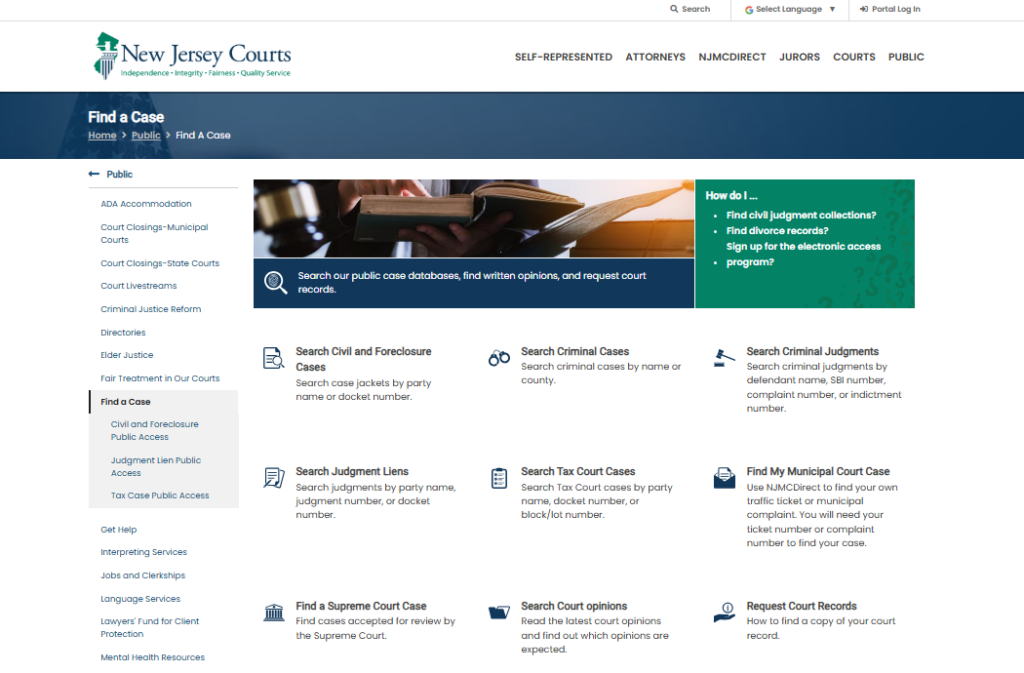
- Click on “Portal Log In”
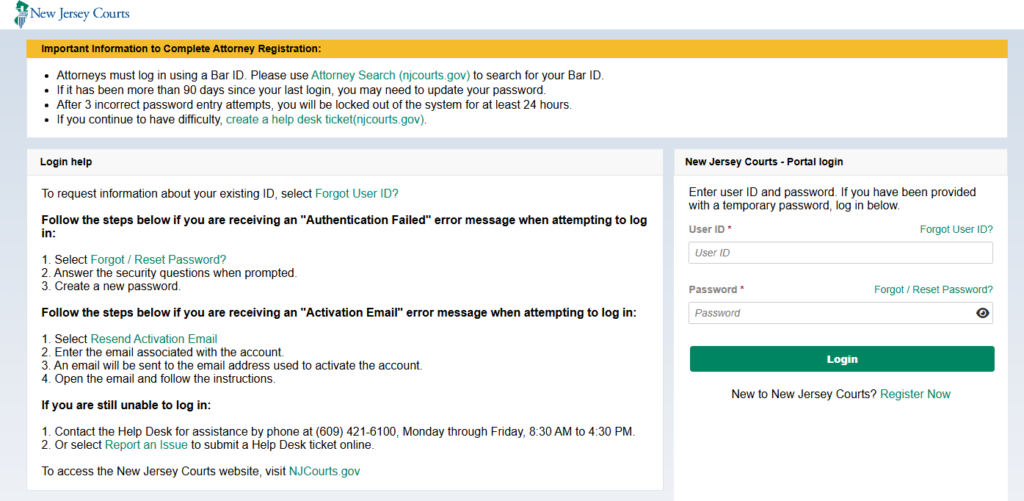
On the homepage, locate and click the “Portal Log In” button to access the court services portal. - Find the Attorney Search Section
At the top of the portal page, you will see the link labeled Attorney Search (njcourts.gov). Click this link to access the attorney search tool.
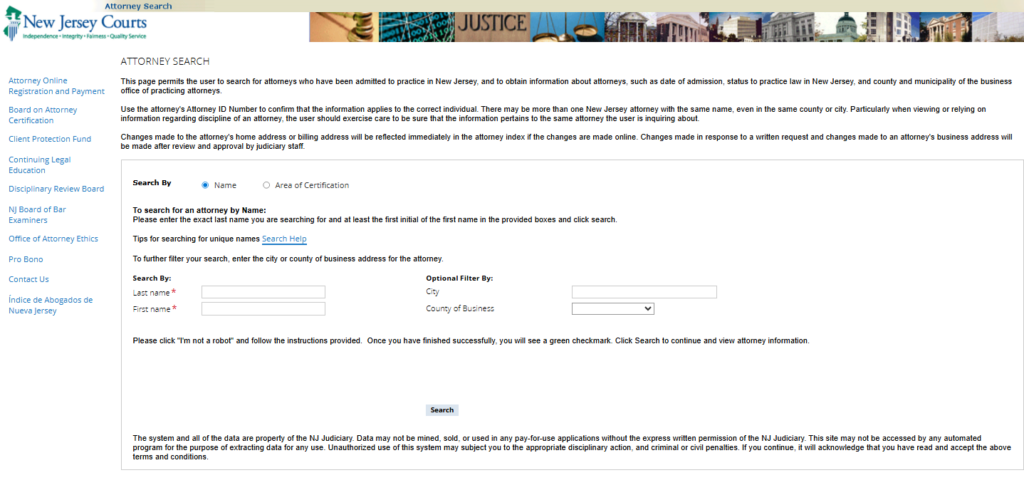
- Search for an Attorney
Enter the attorney’s name, license number, or other relevant details in the search field. You can filter results by location, practice area, or status to find the right attorney. - Choose Search Method
- Enter Attorney’s Name
- Optional Filters
- Verify
- Click Search
- View Search Results
The portal will display a list of matching attorneys. Click on any name to see detailed information, including contact details, license status, and practice areas. - Use Responsibly
The Attorney Search tool provides official information for verification purposes. Always confirm details directly with the attorney or official court sources if needed. - Cost: Basic case information is free; downloading documents may require a fee.
Municipal Court Case Search (MCCS) — Traffic & Local Complaints
The MCCS system allows searches for traffic violations, ordinance cases, and municipal complaints.
Open the Portal
- Go to the Link
- Visit: https://portal.njcourts.gov/webe41/MPAWeb/
- On the page, look for “Press Search to continue” and click the linked Search text.
- Accept the Disclaimer
- A Disclaimer page will appear.
- Read it if needed, then click the “I Accept” link at the bottom.
- Access the Case Search Interface
- After accepting, the Case Search interface will appear.
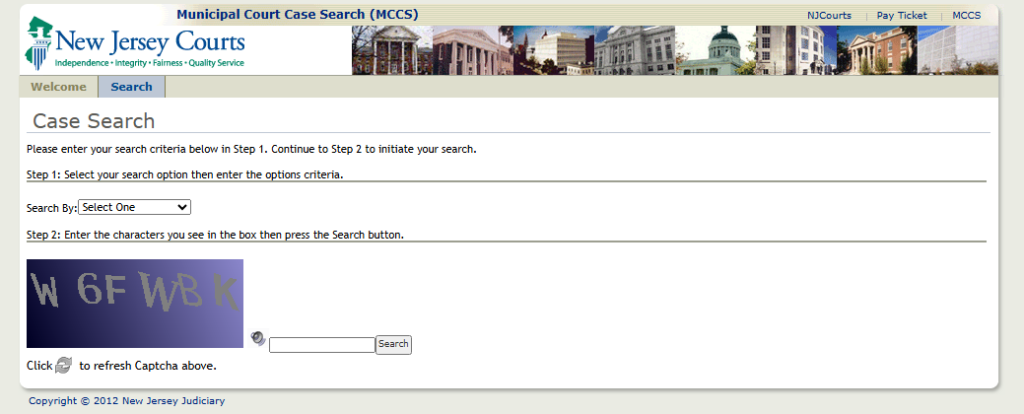
- Choose Search Option
- In Step 1, click the dropdown menu labeled “Search By.
- Select the search criteria, such as:
- Name
- Case Number
- Municipality
- Violation Type
- Enter Captcha
- In Step 2, a Captcha image with letters and numbers will appear.
- Type the characters exactly as shown.
- If hard to read, click the refresh icon for a new Captcha.
- Perform the Search
- Click the Search button.
- Matching cases will be displayed based on your selected criteria.
Monmouth County Open Public Records Search System (OPRS)
The OPRS system provides access to local Monmouth County court records, including civil, criminal, and judgment cases.
How to use:
- Visit the OPRS portal:
- Go to https://oprs.co.monmouth.nj.us/oprs/index.aspx
- From the menu, choose:
- Consolidated Records Search OR
- Clerk Records Search / Document Search
- Fill in the search fields:
- Address, Block & Lot, Owner Name, or Document Type
- Click the Search button → results will appear based on your criteria.
- Consolidated Records Search
- https://oprs.co.monmouth.nj.us/Oprs/GoogleWithUC/Default.aspx
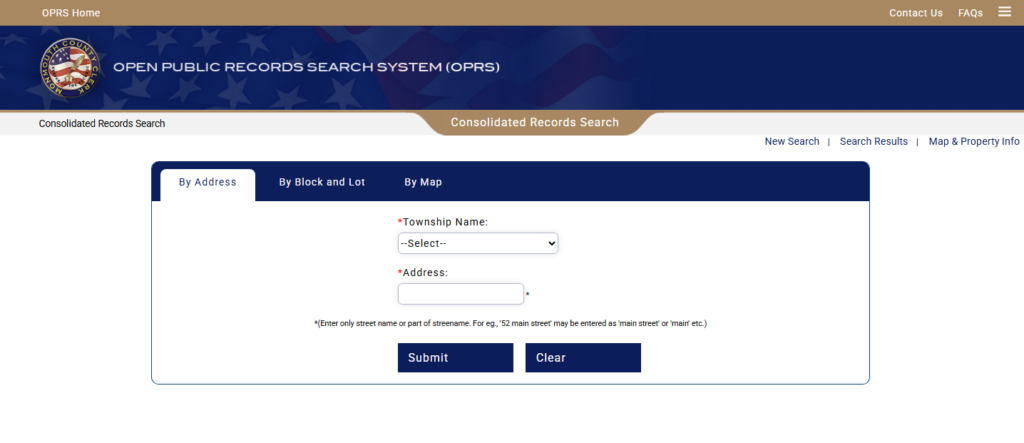
- Basic Clerk Document Search
- https://oprs.co.monmouth.nj.us/Oprs/clerk/ClerkHome.aspx?op=basic
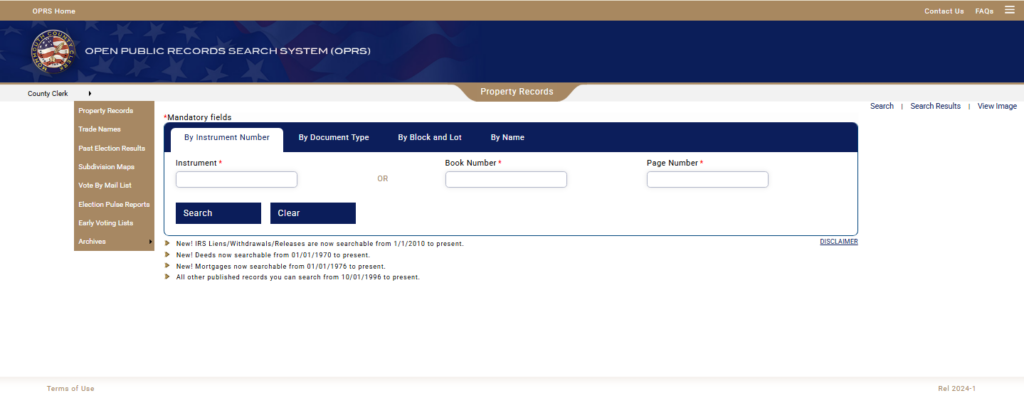
NJMCdirect (Optional Municipal Ticket Payment / Traffic Lookup)
NJMCdirect allows users to pay traffic tickets online and look up municipal ticket information.
How to use:
- Access the portal: https://portalnjmcdirect-cloud.njcourts.gov/prweb/PRServletPublicAuth?AppName=NJMC
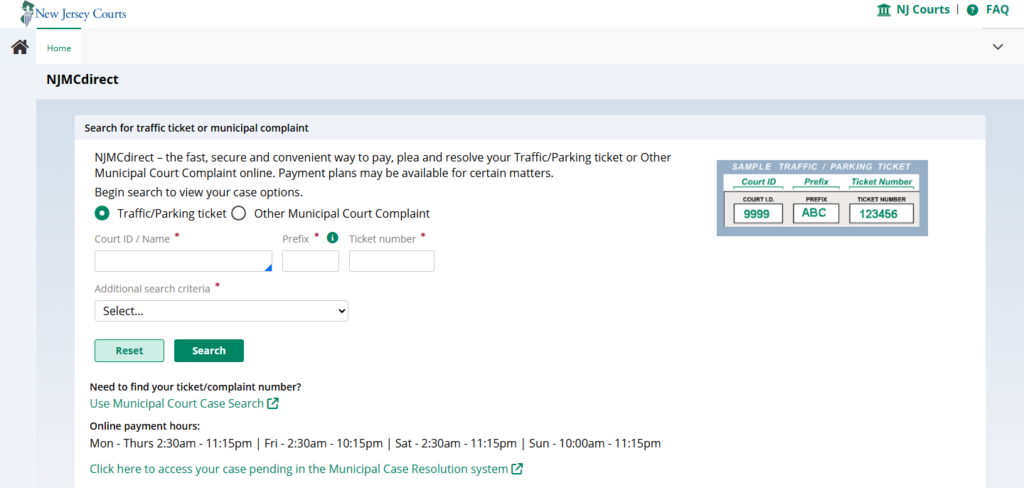
- Choose the case type:
- Traffic / Parking Ticket
- Other Municipal Court Complaint
- Enter the Court ID or Court Name:
- Type the Court ID number (if available), or
- Start typing the Municipal Court name and select it from the list.
- Enter the Prefix:
- Input the prefix code printed on your ticket.
- Common examples include AB, MC, or SC.
- Enter the Ticket Number:
- Type the numeric ticket number exactly as shown on your ticket.
- Select Additional Search Criteria:
- Choose an option from the dropdown, such as Driver’s License Number, Name, or Date of Birth (as required).
- Click the Search button:
The Court Records in Monmouth County
Court records in Monmouth County include official documents created during the legal process. They cover everything from criminal charges to civil disputes and family matters, and many can be searched publicly through official databases.
A court record is any document filed with or issued by the court that documents a case, its parties, and the proceedings. These records provide a legal history of filings, rulings, and court actions. Monmouth County maintains these records at the Superior Court level, ensuring that judicial decisions are properly documented and, in many cases, accessible to the public.
Types of Court Records
Monmouth County court records can be categorized into several main types:
- Criminal Records: Include felony and misdemeanor charges, arrests, indictments, plea agreements, and sentencing documents. These are often referenced during background checks.
- Civil Records: Cover disputes between individuals, businesses, or organizations. Examples include breach of contract, personal injury lawsuits, and property disputes.
- Family Law Records: Encompass divorce filings, child custody and support cases, and domestic violence orders.
- Municipal Court Records: Focus on violations of local ordinances, traffic tickets, and minor criminal offenses.
Each record type contains detailed information such as case numbers, court dates, judge assignments, and involved parties. Users searching for court documents often use a docket number search to find specific cases quickly.
Public Case Search in Monmouth County
A public case search allows individuals to view information about ongoing or closed court cases without visiting the courthouse in person. These searches are available online through the Monmouth County court system.
Key points about public case searches:
- They provide access to judicial records such as filings, motions, and judgments.
- Users can search by party name, case number, or filing date.
- Some documents may have restrictions for privacy reasons, particularly in family law cases.
This search system supports transparency and helps citizens verify case information efficiently. Many people rely on these tools for background checks, legal research, or verifying court outcomes.
How to Request Court Records
Requesting Monmouth County court records can be completed in person or by mail, and certified copies are available for official use. Anyone needing records should follow the proper forms and fee requirements to ensure their request is processed efficiently.
Requesting Physical or Certified Copies
To request a physical copy of a court record, the individual must submit a records request form to the Monmouth County Superior Court Clerk’s office. Certified copies, often needed for legal or official purposes, require payment of a Certified copy fee, which varies depending on the type of record.
Steps to request records include:
- Identify the case: Gather the case number, names of parties, and the date of filing. This information helps the clerk locate the correct record quickly.
- Complete the request form: Forms are available at the Monmouth County Clerk’s office or can be downloaded online from official county websites. Include all required details to avoid delays.
- Submit the form: Requests can be mailed, delivered in person, or sometimes submitted via an official email portal.
- Pay the fees: Certified copies generally have a fee ranging from $5 to $10 per page, while standard copies may cost less. Payment can usually be made by check, money order, or card if submitting in person.
- Receive the record: Processing times vary depending on the request method and the volume of cases. In-person requests are often faster than mailed ones.
Tip: Always specify whether a certified copy is needed. Certified records are stamped and signed by the clerk, making them legally valid for court filings or official verification.
Handling Closed Cases
For closed or archived cases, additional steps are required:
- Requesters must indicate clearly that the case is closed.
- A special NJ Superior Court Clerk request form may be required for archived records.
- Processing for older cases can take longer since records may be stored offsite.
The Monmouth County Clerk’s office handles closed cases with the same structured approach: verifying the case, confirming payment, and sending certified copies if requested.
Key considerations for closed cases:
- Always provide full party names and approximate filing dates.
- Include a phone number or email for communication in case clerks need clarification.
- Fees for certified copies remain standard, but retrieval may add extra time.
Quick Reference Table: Requesting Court Records
| Record Type | Form Needed | Fee Range | Notes |
|---|---|---|---|
| Active Case Copy | Records Request Form | $1–$2 per page | Available in-person or by mail |
| Certified Copy | Records Request Form | $5–$10 per page | Legal or official use |
| Closed/Archived Case | NJ Superior Court Clerk Form | $5–$10 per page | Retrieval may take longer |
Fees, Restrictions & Public Access Rules
Monmouth County court records have both free and fee-based options, depending on the type of document requested. Certain records are restricted, including sealed files and juvenile cases, and cannot be viewed by the public.
Access to court records follows clear public records rules and established procedures. Basic case information, such as docket summaries, parties involved, and hearing dates, is often available online at no cost. More detailed documents, including motions, judgments, or full court filings, typically require a fee. Payment methods vary, with some requests processed in person at the courthouse Records Department or through official online portals.
Typical fee structure:
| Document Type | Cost Range | Notes |
|---|---|---|
| Case Summary / Docket Sheet | Free | Online access available |
| Copies of Court Filings | $0.50–$2 per page | Varies by document type |
| Certified Copies | $10–$25 | Requires formal request |
| Jury or Grand Jury Records | Varies | Often restricted to authorized parties |
While most records are accessible, some have access restrictions. Sealed records, including sensitive family court cases, certain adoption files, and juvenile records, are protected to maintain privacy. Requests for these files are generally denied unless authorized by a judge or under specific legal circumstances. Similarly, law enforcement and OPRA (Open Public Records Act) requests may be limited to ensure confidentiality.
Key public access rules include:
- Juvenile case files are not publicly available.
- Sealed records remain confidential unless a court order permits release.
- Certain criminal investigation documents are restricted to law enforcement or authorized representatives.
- Bulk downloads of court records may be prohibited to protect personal information.
For those seeking documents, it helps to check official sources first and confirm whether the desired record falls under restricted categories. Following these rules ensures compliance with state regulations while respecting the privacy of individuals involved.
Differences Between Official & Third‑Party Case Search
Official court records provide the most accurate and complete information for Monmouth County cases. Third-party sites can be convenient but often lack reliability and may contain outdated or incomplete data.
Why Official Sources Are Reliable
Official sources, such as the Monmouth County Superior Court database, maintain records directly from court filings. This ensures the accuracy of records, including case numbers, party names, and filing dates. Users can be confident that the information reflects the current status of cases, including recent updates or court orders.
Key advantages of official sources include:
- Direct court data: Records come straight from the courthouse system.
- Complete case history: Every motion, judgment, and document is included.
- Consistent updates: Changes are recorded promptly to reflect the current case status.
For anyone performing a Monmouth County case lookup, official sites are the safest option to obtain trustworthy information.
Risks of Third-Party Sites
Third-party aggregators may seem convenient, but they often collect information from outdated sources or public summaries. This can lead to inaccurate or incomplete records. Users relying solely on these sites risk missing critical details, which can be problematic for legal, financial, or personal research.
Some common issues with third-party sites include:
- Incomplete case files: Only partial information may be available.
- Delayed updates: Case changes may take weeks or months to appear.
- Hidden fees: Some services charge extra for documents already public.
A simple comparison highlights the differences:
| Feature | Official Court Records | Third-Party Sites |
|---|---|---|
| Source of Data | Direct from court | Aggregated from multiple sources |
| Accuracy | High | Moderate to low |
| Updates | Real-time | Delayed |
| Fees | Standard court fees | Extra service charges |
| Document Completeness | Full case history | Often partial |
Locations & Contact
The Monmouth County Superior Court and its municipal branches provide public access to court services, records, and administrative support. Visitors can find full addresses, phone numbers, office hours, and accessibility details for all key courthouse locations in the county.
Main Courthouse
The primary courthouse for Monmouth County is located in Freehold, serving as the central hub for civil, criminal, family, and probate cases. Visitors can contact the court for case information, filings, or public records requests.
Address & Contact:
- Monmouth County Superior Court
- 71 Monument Park, Freehold, NJ 07728
- Phone: (732) 431-7000
- Email: info@co.monmouth.nj.us
Office Hours:
- Monday–Friday: 8:30 AM – 4:30 PM
- Closed on state holidays
Accessibility & Amenities:
- Wheelchair-accessible entrances and elevators
- Public transport nearby (Freehold Bus Terminal within walking distance)
- On-site parking with designated handicap spaces
Additional Courthouse Locations
Monmouth County also has municipal courts to handle local cases such as traffic violations, minor criminal offenses, and municipal ordinance issues. Key locations include:
| Municipal Court | Address | Cases Handled | Phone |
|---|---|---|---|
| Freehold Borough Court | 51 West Main Street, Freehold, NJ 07728 | Local traffic, minor offenses | (732) 919-1800 |
| Asbury Park Municipal Court | 210 5th Avenue, Asbury Park, NJ 07712 | Local ordinance, parking tickets | (732) 502-5320 |
FAQ — About Court Records
Users often have questions about Monmouth County court records and case searches. This section provides clear answers to help with common concerns about court lookup and case information.
How quickly do new filings appear online?
New filings typically appear on the Monmouth County Court online portal within one to two days after staff enter them into the system. Some cases, like complex filings or those that are sealed, may take slightly longer. The court posts recent updates daily, so users can usually see motions, complaints, and judgments almost in real time, while urgent cases may be confirmed by contacting the Monmouth County Clerk’s Office directly.
Can I search by docket number only?
Yes, searching by docket number is one of the fastest ways to locate a specific case. Entering the exact docket number into the Monmouth County Court case search tool usually retrieves the case immediately, without showing unrelated records. Users should ensure the format matches the court’s numbering system, and if no result appears, it may indicate the case has not yet been filed online or belongs to a different court division.
Can I find municipal traffic cases online?
Municipal traffic cases are generally not available on the Superior Court’s online portal because they are handled by local municipal courts. To view these cases, users must contact the court in the town where the citation was issued. Many municipalities provide their own online lookup tools, while others may require a phone call or an in-person visit to obtain details. Understanding the correct court system ensures users find the information they need efficiently.
How do I get certified divorce records?
Certified divorce records are obtained through the Monmouth County Clerk’s Office, as they are official documents recognized for legal purposes. To request a copy, users must provide details such as the names of the parties, the divorce date, and the docket number if available, and pay the applicable certification fee. Requests can often be submitted by mail, in person, or online if the service is offered, and certified copies are necessary for legal processes like remarriage, name changes, or government filings.